Automating Visa’s Legacy Dispute Workflow
A legacy system trapped critical data behind a UI, forcing humans to act as routers and document generators. I built a headless automation engine combining RPA and a custom C# .NET rule engine to eliminate manual triage, standardize compliance, and protect SLAs.
The System Before
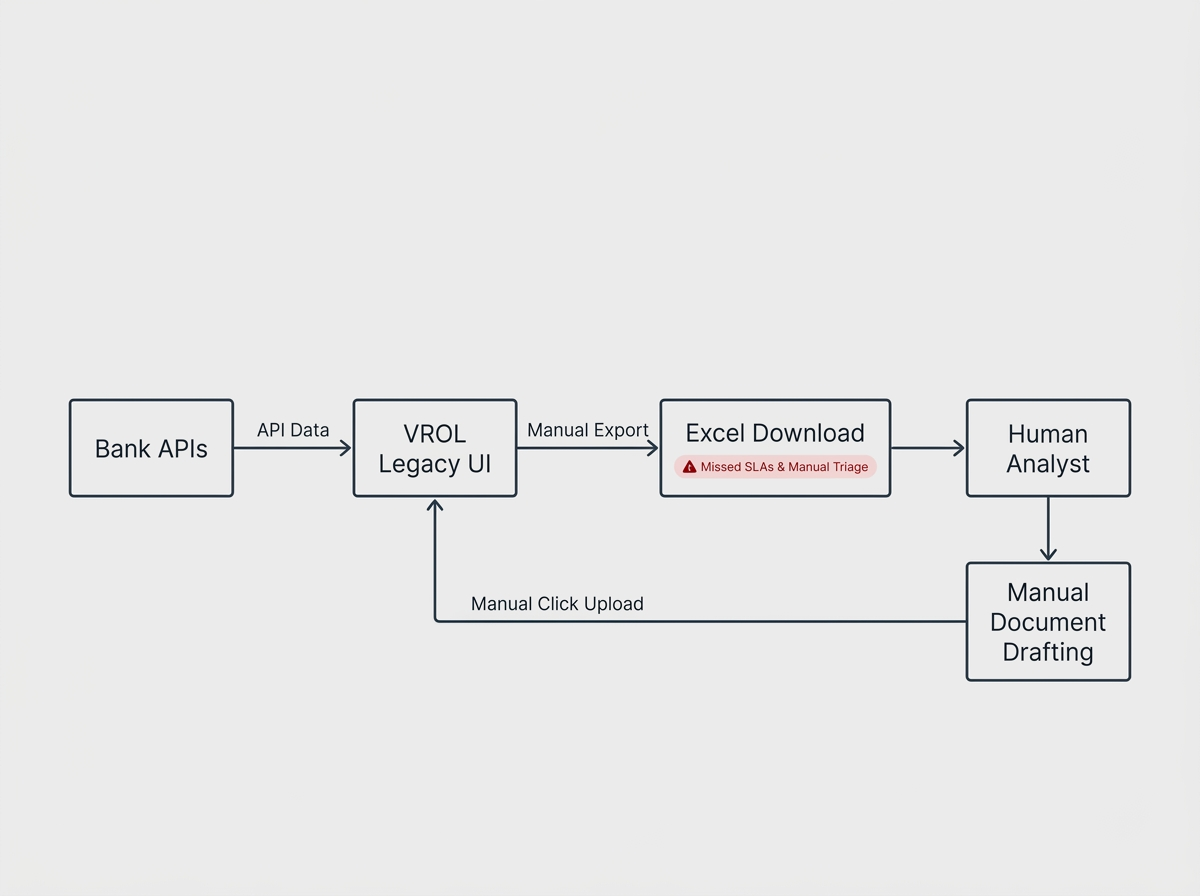
Disputes flowed into Visa from various banks via API, but for our analysts, the workflow was entirely manual and bottlenecked by VROL our legacy case management platform. Because analysts couldn't easily query or filter complex logic directly within the VROL UI, they resorted to a highly manual daily triage process:
The Dump: Analysts downloaded massive Excel spreadsheet exports from VROL just to figure out what cases existed.
The Sort: They manually filtered the Excel sheets to identify which cases were approaching SLA deadlines.
The Action: They opened individual cases in VROL, reviewed data, and made a decision.
The Documents: They manually authored dispute letters.
The Upload: They uploaded bespoke documents back into VROL to resolve the case.
How I Framed The Problem
The standard request from operations was for "more headcount to process the Excel sheets" or "better training on document creation." But the problem wasn't human inefficiency; it was system isolation. VROL held the data, but lacked an accessible API for this specific internal workflow. If we couldn't get a native API to extract case data and write back decisions, we had to build a synthetic one. We needed a "brain" to make the decisions, and "hands" to interact with the legacy UI.
What I Built.
I architected a three-part automation loop that completely bypassed the need for manual Excel triage.
The Ingestion Layer (RPA Scraper): I built an RPA bot that continuously scanned VROL online, grabbing case data directly from the screens and logging it into a centralized SQL database.
The Brain (C# .NET Rule Engine): I built a standalone rule engine in C# .NET. This engine continuously analyzed the database, applied business logic, identified SLA priorities, and calculated the required outcome for each case.
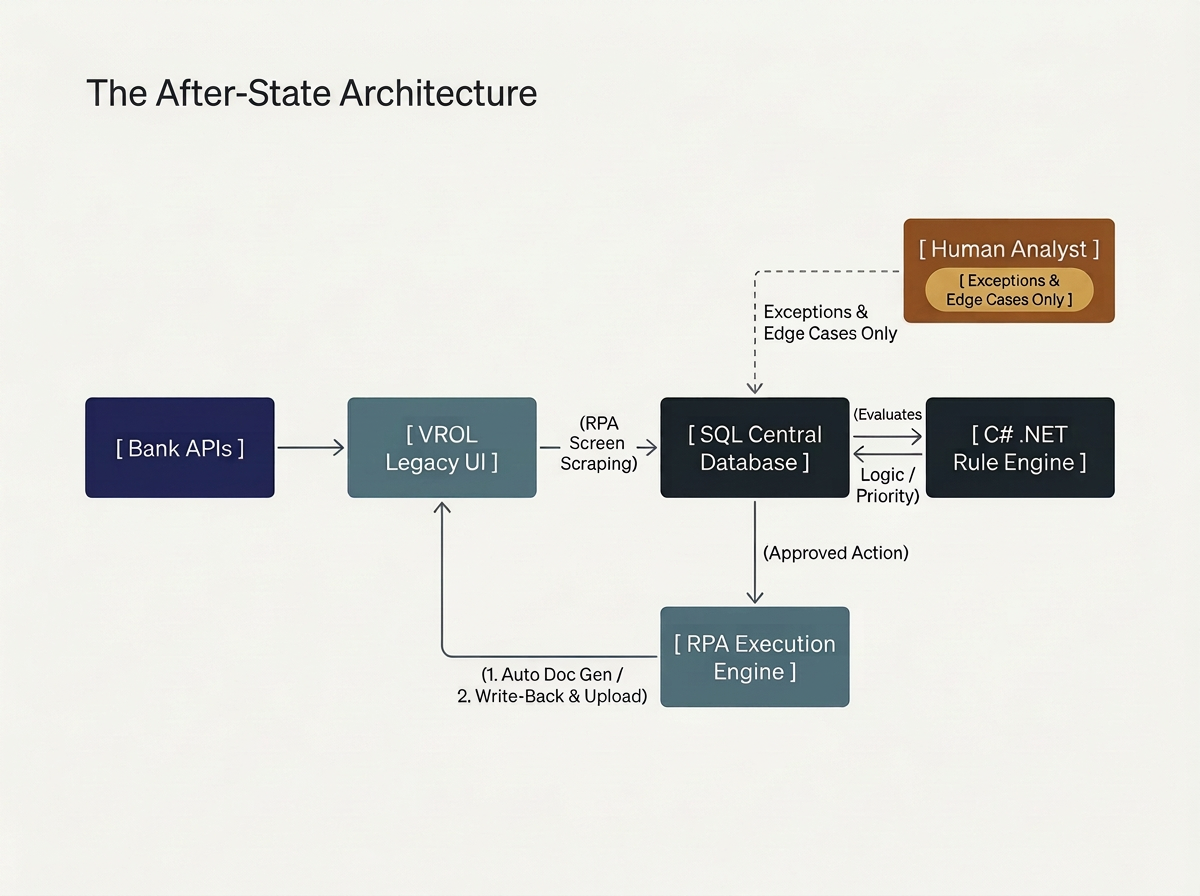
The Execution Layer (RPA Write-Back & Doc Gen): The RPA bot read the output from the database. It automatically generated standardized dispute letters, navigated back into the VROL UI, applied status updates, and uploaded the generated documents.

What Went Wrong Along the Way
-
VROL was a closed system. We couldn't wait years for a backend API, but building logic into RPA bots that rely on screen-scraping is brittle. I strictly decoupled the "hands" from the "brain." I used RPA only for data transport. I moved 100% of the business logic into the C# .NET rule engine. When VROL UI updates inevitably broke the RPA scraper, the underlying database and queue remained intact.
-
I discovered there were dozens of variations for what was legally supposed to be the same document. I forced operations to approve a single template matrix, then built a dynamic document generation module to assemble exact, standardized PDFs before the RPA upload step.
-
Analysts were terrified of letting go of their Excel sheets. I ran the system in "Shadow Mode" for three weeks, showing them daily reports of what the bot would have done. Once they saw the bot caught cases they had missed, they asked us to turn on the write-back layer ahead of schedule.
Results
SLA Protection: Dropped missed SLAs due to manual queueing errors to zero.
Standardization: 100% of generated documents now adhered to strict, automated legal templates.
Cycle Time: Replaced hours of daily Excel sorting and manual document drafting with continuous, background processing.
Time Saved: 30000+ analyst hours annually saved
